The new YouTube’s AI assistant (“Ask Studio”) is helpful for reading your own video analytics, comments, and performance.
But it comes with limitations.
The problem starts when you try to study what works on other channels in your niche.
Key Takeaways
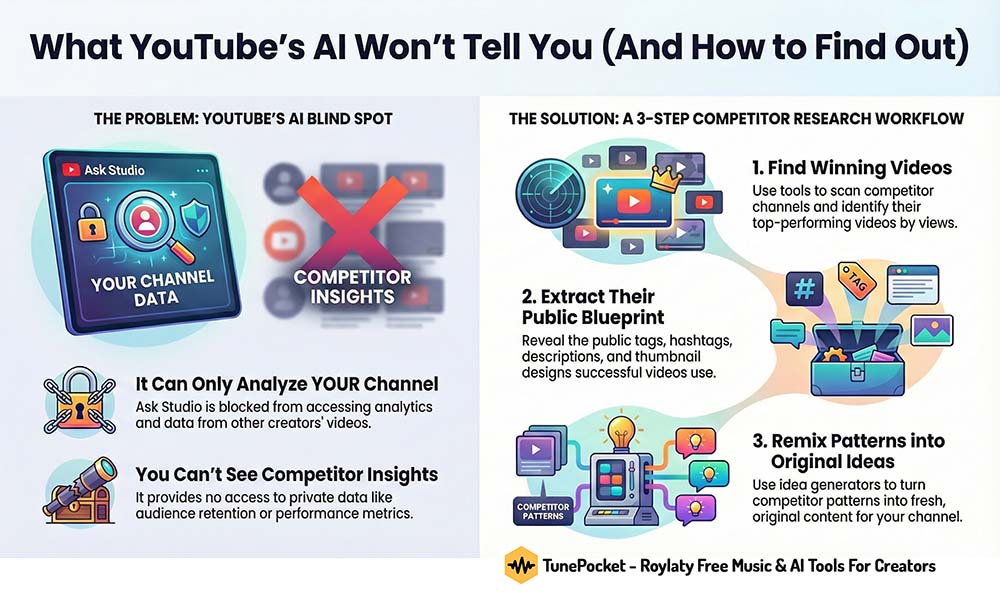
TL;DR: YouTube Studio AI can only analyze your channel. When you want to learn from other channels, use TunePocket creator tools to pull public data like titles, tags, hashtags, descriptions, thumbnails, and branding, then turn those patterns into original ideas for your own videos.
Why YouTube studio AI can’t access other channels
YouTube Ask Studio AI tool is built to protect creator data. That is why it refuses to analyze videos that do not belong to your channel.
If you ask this AI assistant to get you some information on somebody else’s video here’s what you get:

As Ask Studio, I can only access and analyze data for videos published on your channel, TunePocket.
The video does not appear to be part of your channel’s content, so I am unable to fetch any analytics, retention data, or comments for it.
In practice, that means:
- No analytics or audience retention for videos you do not own
- No access to private performance insights from other creators
- You only see deep data for content on your own channel
You still need to:
- See which topics and angles win in your niche
- Understand how leading channels use titles, tags, descriptions, and thumbnails
- Spot repeatable patterns you can adapt to your own style
You do not need their private analytics to do that. You only need smart tools that read the public signals they already publish.
That is where TunePocket steps in as your competitor research co-pilot.
Step 1: find videos worth studying
First, decide which videos are worth your time. Focus on content that clearly performs well in your niche.
Tool: Youtube channel search
Quickly explore any channel, see what they publish, and spot standout videos by view count and visible engagement.
Use it to build a short list of benchmark videos you want to study.
Tool: Youtube top 100 channels analyzer
Zoom out and see how the biggest channels behave across the platform.
Look at upload pace, title formats, and broad content patterns instead of single videos.
Youtube top 100 channels analyzer
Once you have a few benchmark videos and channels, move on to their public metadata and packaging.
Step 2: extract the metadata blueprint
You cannot see another channel’s retention graphs, but you can see how they describe and present each video.
That public metadata is the blueprint of their search and click strategy.
Tool: Youtube video tags extractor
Paste any video URL and pull the exact tags they use.
This shows how they describe the topic to YouTube search and recommendation systems.
Tool: Youtube hashtags extractor
Extract all hashtags from competitor videos and Shorts.
See how they group topics, trends, and formats to appear in hashtag feeds.
Tool: Youtube channel keywords copy
Reveal the channel level keywords that tell YouTube what the channel is about.
This helps you understand how successful creators position their niche and expertise.
With just these three tools, you can reconstruct how a competitor labels content for YouTube’s systems.
Tool: Video description copy
Copy the full description from any video to study how they:
- Open with a hook or summary
- Place keywords, links, and social proof
- Use timestamps and calls to action to drive the next click
Tool: Youtube thumbnail downloader
Save thumbnails from high performing videos and look for repeat patterns:
- Faces or no faces
- Big bold text or almost no text
- Dark, busy layouts or clean, bright layouts
Tool: Youtube banner and logo downloader
Grab channel banners and logos to see how they communicate their brand promise at a glance.
Youtube banner and logo downloader
Together, these tools give you a clear competitor blueprint across the whole journey.
Specifically:
- How your competitors title, tag, and hashtag videos
- How their thumbnails and branding catch the eye
- How descriptions and hooks push viewers to watch
- How links, offers, and funnels are placed in descriptions
Step 3: turn insights into your own original content
Copying another channel line by line is risky and unhelpful.
The smart move is to use their patterns as input and generate original ideas tailored to your audience.
Tool: Youtube video ideas generator
Feed in your channel details and get fresh angles based on what’s trending now.

Tool: Youtube video title generator
Enter your topic, keywords, or even a competitor title and generate multiple SEO friendly, human readable options.
Use it to test different angles before you upload.
Tool: Youtube video tags generator
Start from competitor tags, then expand into related keyword ideas to cover more search variations without losing focus.

Youtube hashtags generator
Create hashtag sets that align with what is already working in your niche while keeping your channel identity distinct.
These AI helpers handle the search side so you can focus on making the video itself better.
Putting the strategy together
When YouTube Studio AI tells you it can only analyze your own channel, your research does not have to stop.
Use it as the internal analyst for your content and use TunePocket tools as your external research partner.
- Find winning videos and channels with YouTube Channel Search and the Top 100 Analyzer.
- Extract their public strategy with tags and hashtags tools, channel keyword copy, description copy, and thumbnail or banner downloaders.
- Remix it into your own plan with the Ideas, Title, Tags, and Hashtags Generators to create original uploads that fit proven patterns.
Think of YouTube Studio as your in house analyst focused on your stats, and TunePocket as the field scout and creative co-pilot that helps you learn from everything happening outside your channel.
Frequently Asked Questions
Can i use YouTube studio AI and TunePocket tools together?
Yes. Use YouTube Studio AI to understand what works on your own channel and TunePocket tools to research public data from other channels.
Together, they give you both internal performance insights and external market patterns.
Do TunePocket tools access private analytics from other channels?
No, that would be against YouTube policy.
How often should i run competitor research with these tools?
A practical rhythm is once per 2 weeks or whenever you plan a new content series.
Refresh your list of benchmark channels, update your notes on titles and tags that perform well, and then feed those insights into TunePocket idea and title generators.
Download 14,000+ Royalty Free Music Tracks And Sound FX
Unlimited download | Lifetime license | Commercial use