Want to build a sleep, meditation, relaxation, or focus app? AI coding tools make it easier than ever to create a working audio player without developing everything from scratch.
However, building the app is only part of the process. You also need quality audio content and the legal rights to let people listen to it.
Not sure what kind of app to build? Explore 7 music and sound app ideas inspired by real TunePocket customers, including sleep, meditation, wellness, storytelling, and more.
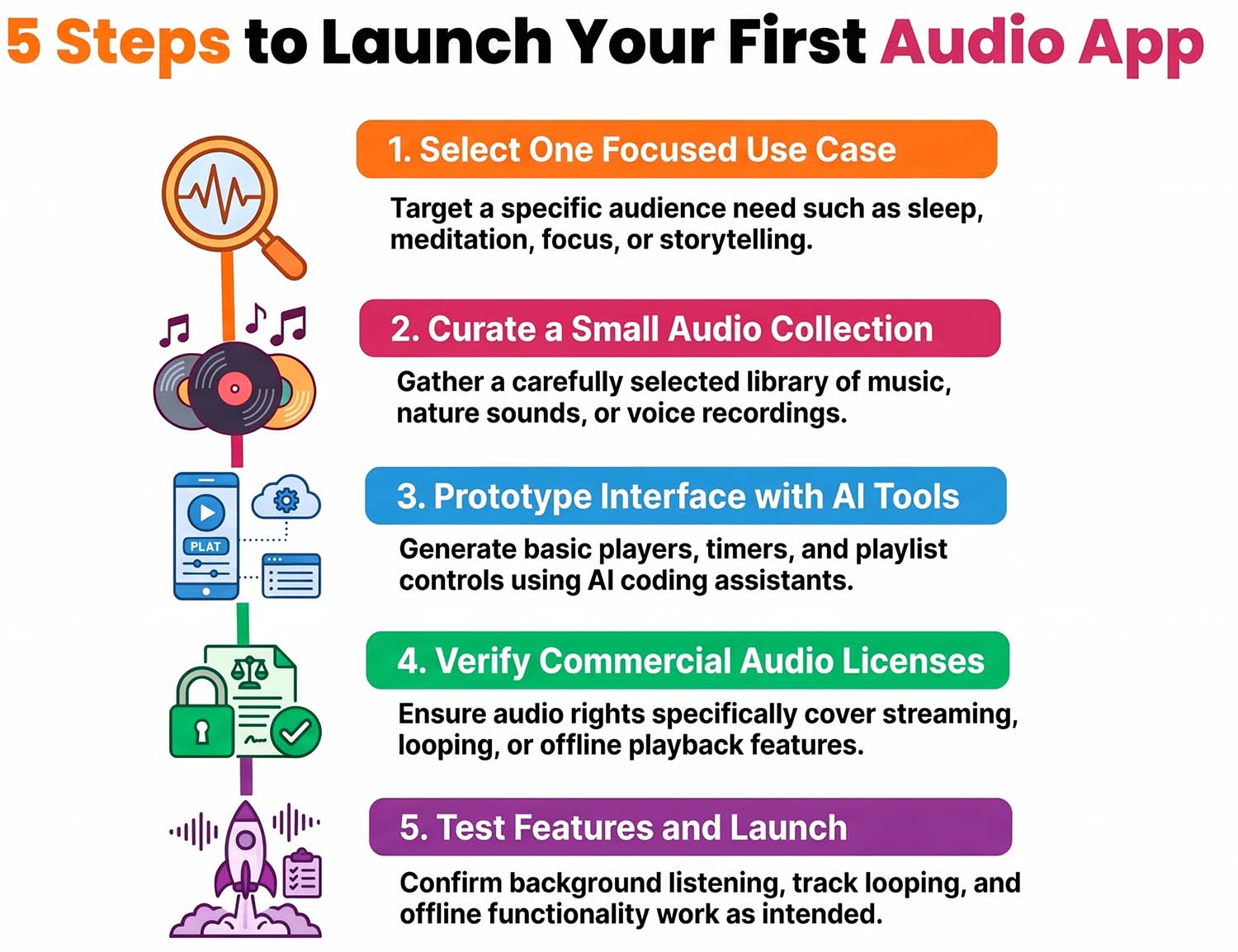
Here are five practical steps to get started.
1. Choose One Specific Use Case
Start with a clear purpose. Your first app could help users fall asleep, meditate, concentrate, or listen to calming nature sounds.
A focused app with a few useful features is easier to build, test, and market than an all-in-one audio platform.
2. Build A Small Audio Collection
You don’t need hundreds of recordings to launch. Start with a carefully selected collection of music, ambient soundscapes, nature sounds, or guided recordings.
TunePocket offers thousands of ready-to-download royalty-free music tracks and sound effects, helping developers build audio libraries without recording or producing everything themselves.
If your app includes guided meditation sessions, you can also explore MyRelaxation.Online for professionally recorded, ready-to-use guided meditations and relaxation voice recordings, saving time on scripting and recording your own narration.
Choose sounds that match your app’s purpose and provide enough variety to encourage repeat listening.
3. Prototype Your App With AI Coding Tools
Use an AI coding assistant or app builder to create a simple interface with essential listening features:
- Audio playback and playlist selection
- Looping and sleep timers
- Background listening
- Optional offline playback
Build a working prototype first, then improve the interface based on actual user feedback.
4. Get The Right Music And Sound Licenses
This is particularly important for audio apps. Many regular stock music licenses cover background music in videos but do not permit users to independently select and listen to tracks inside an app.
TunePocket offers a dedicated commercial license for audio listening apps.
The TunePocket Business Streaming license is designed specifically for sleep, meditation, relaxation, wellness, and other listening-focused applications.
It supports music and sound streaming, independent track selection, looping, and protected offline playback. A lifetime license extension is also available if you want to keep licensed recordings in your app without ongoing subscription renewals.
This makes TunePocket a practical source for both the audio content and the commercial licensing needed to operate a listening app legally.
5. Test Your App And Launch
Before publishing, test playback on real devices. Check background listening, looping, timers, audio transitions, and offline access if supported.
Make sure the original audio files cannot be extracted or shared outside the app. Start with a small release, collect feedback, and expand your audio collection as your audience grows.
Frequently Asked Questions
Can I Use Royalty-Free Music In A Paid Audio App?
Yes, provided your license specifically covers the app’s playback model. TunePocket Business Streaming license supports commercial listening apps where users independently select, stream, or loop licensed audio.
Can I Keep Using TunePocket Music After My Subscription Ends?
For standalone listening apps, you must maintain an active Business Streaming subscription or obtain the lifetime Streaming extension to continue offering the licensed recordings.
Ready to build your audio app? Explore TunePocket’s royalty-free music and sound effects and choose a licensing option designed for your app.
Free infographic
Download 15,000+ Royalty Free Music Tracks And Sound FX
Unlimited download | Lifetime license | Commercial use