
You do not need access to your competitors private YouTube Analytics to learn from their channel.
Public information can reveal which topics attract viewers, which recent videos outperform the channel’s normal results, how often the creator publishes, and whether the channel’s current strategy is working.
The challenge is collecting and comparing this information efficiently. Looking through dozens of videos manually takes time, and total view counts alone do not always show what is working now.
TunePocket’s free YouTube Channel Stats Checker organizes public channel data into a practical competitor research report.
Key Takeaways
- Competitor research reveals current topics, formats, titles, and publishing patterns.
- YouTube Channel Search helps you find relevant channels by keyword, country, language, topic, and channel age.
- Recent uploads provide better insights because viewer interests and YouTube trends change.
- YouTube Channel Stats Checker can analyze any channel’s recent uploads and report views per day, median views, engagement, and outlier scores.
Why Research YouTube Competitors?
Competitor research helps you understand what viewers in your niche are watching now.
The goal is not to copy another creator. The goal is to identify patterns that can improve your own content decisions.
For example, competitor research can help you:
- Find video ideas.
- Study successful titles.
- Compare content formats.
- Understand publishing frequency.
- Spot emerging interests.
How To Find Your Competitors On YouTube
Before analyzing competitors, you need to find channels that target a similar audience and publish content related to your niche.
Regular YouTube search is a useful starting point, but it is not always the best tool for competitor discovery.
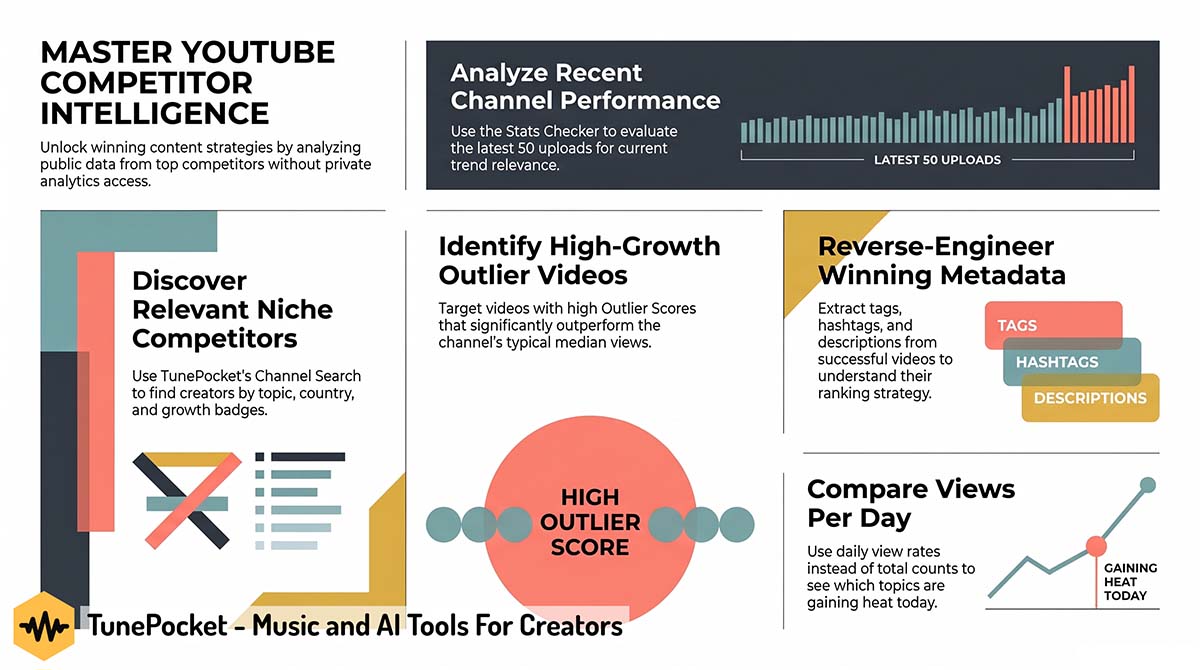
TunePocket’s free YouTube Channel Search tool can provide a more focused way to discover relevant channels.
Enter a keyword related to your niche, then refine the search using options such as country, language, topic, and channel creation date. You can also search specifically for newer channels created within the last 7, 30, or 90 days.
Look for active channels that target a similar audience, cover related topics, use comparable formats, and are close enough in size to provide useful benchmarks.
Once you find several relevant channels, export their URLs or @handles and analyze them with the YouTube Channel Stats Checker.
Use YouTube Channel Stats Checker to see what works for your competitors
The YouTube Channel Stats Checker analyzes public channel statistics and up to 50 of the channel’s latest public videos.
Why Analyzing Recent YouTube Uploads Matters More Than All Including Videos?
Recent uploads provide a better view of what works now because YouTube trends, viewer interests, competition, and recommendation patterns change over time.
How to Use The YouTube Channel Stats Checker?
Enter a YouTube channel URL, channel ID, or @handle. The tool creates a channel overview and a sortable table of recent uploads.
The report includes:
- Subscriber count, total channel views, and public video count.
- Channel creation date and latest upload date.
- Video titles, thumbnails, publishing dates, and lengths.
- Total views and estimated views per day.
- Likes, comments, and engagement rates.
- Average and median views across recent uploads.
- Estimated publishing frequency and recent Shorts percentage.
- Outlier scores that identify unusually strong or weak videos.
No YouTube login, registration, software installation, or access to private channel analytics is required.

What Competitor Research Can Reveal
The Competitor’s Typical Performance
Average views can be influenced by one or two viral videos. Median views show the middle result and can provide a more realistic benchmark for the channel’s normal recent performance.
Use the median to understand what a typical upload receives rather than judging the entire channel by its biggest success.
Videos Growing Faster Than Expected
Views per day make it easier to compare videos published on different dates.
A recent upload may have fewer total views than an older video but may be attracting viewers at a much faster daily rate. This can indicate a topic that is currently gaining interest.
Unexpected Breakout Topics
The outlier score compares each video with the channel’s recent median performance.
A video with a high outlier score received substantially more views than the channel’s typical recent upload. Examine its topic, title, thumbnail concept, format, length, and publishing date to understand what made it different.
Topics That Underperform
Competitor research is also useful for finding weak results.
If several videos about the same subject consistently receive fewer views than the channel’s median, the topic may have limited demand, poor positioning, or too much competition.
Publishing And Format Patterns
Review upload dates and video lengths to see whether the channel follows a consistent schedule or favors a specific format.
The recent Shorts percentage can also help you determine whether the competitor relies primarily on short-form videos, long-form content, or a combination of both.
Audience Interaction
Likes and comments provide additional context beyond views.
A video with moderate views but strong engagement may cover a subject that generates discussion, attracts loyal viewers, or builds a stronger relationship with the audience.
You can export the channel report as a CSV or Excel XLSX file, copy the analyzed video URLs, or copy a concise channel summary for further research.
Use This Simple Competitor Research Process
- Choose three to five relevant channels.
Focus on creators serving a similar audience rather than selecting only the largest channels in the category.
- Analyze each channel’s latest uploads.
Look for strong recent results instead of relying on lifetime popularity.
- Sort by outlier score and views per day.
This helps surface videos performing above the channel’s normal level.
- Record recurring topics and formats.
Note subjects, title structures, video lengths, and presentation styles that appear across multiple successful uploads.
- Compare several competitors.
A single breakout video can be an exception, while similar results across several channels provide a stronger signal.
- Create an original content angle.
Use the research to understand audience demand, then add your own experience, examples, opinion, or presentation style.
More Useful Tools For YouTube Competitor Research
After identifying a competitor’s strongest recent videos, you can examine how those videos use tags, hashtags, and descriptions.
TunePocket provides several free tools that make this information easier to collect:
- YouTube Tags Extractor reveals the tags attached to a public video. Compare several successful videos to find recurring keywords and topic phrases.
- YouTube Hashtags Extractor collects hashtags from a video’s title and description. This can reveal how competitors label specific topics, series, trends, and content formats.
- YouTube Video Description Copy displays the complete public description so you can study its structure, keywords, links, calls to action, timestamps, and disclosures.
Use these tools to identify patterns across multiple competing videos. Do not copy another creator’s description or metadata unchanged. Adapt relevant ideas to your own topic, audience, and original content.
Free Tools For YouTubers and Creators
Boost your channel | Save time | Grow faster

Start Researching YouTube Competitors
You do not need a competitor’s private analytics to make better-informed content decisions.
Recent public uploads can show which topics are attracting attention, which videos are growing quickly, how frequently a channel publishes, and which results stand out from its normal performance.
Use the free YouTube Channel Stats Checker to organize this information and turn manual channel browsing into a useful research process.
Free Infographic
Download 14,000+ Royalty Free Music Tracks And Sound FX
Unlimited download | Lifetime license | Commercial use