Instead of opening each video in a playlist and copying links one by one, you can use TunePocket YouTube Playlist To Text Converter to extract the playlist into a list of video links.
The tool gives you the list of all YouTube video links in that playlist, so you can simply copy-paste the entire list into NotebookLM.
Why smart creators use use YouTube Playlists with NotebookLM?
NotebookLM works best when you give it useful sources. A YouTube playlist can be a great source collection if it contains tutorials, interviews, lectures, product research, podcast episodes, reviews, or educational videos.
Once the video links are added to NotebookLM, you can use the playlist as a research notebook. You can ask questions, compare ideas across videos, create summaries, pull out key points, or prepare notes for later use.
This is especially helpful when the playlist is too long to watch from start to finish.
How To Copy A YouTube Playlist To NotebookLM
-
Step 1
Open the YouTube playlist you want to use.
-
Step 2
Copy the playlist URL from your browser.
-
Step 3
Paste the playlist URL into TunePocket’s YouTube Playlist To Text Converter.
-
Step 4
Generate the playlist text and copy the list of video titles and links.
-
Step 5
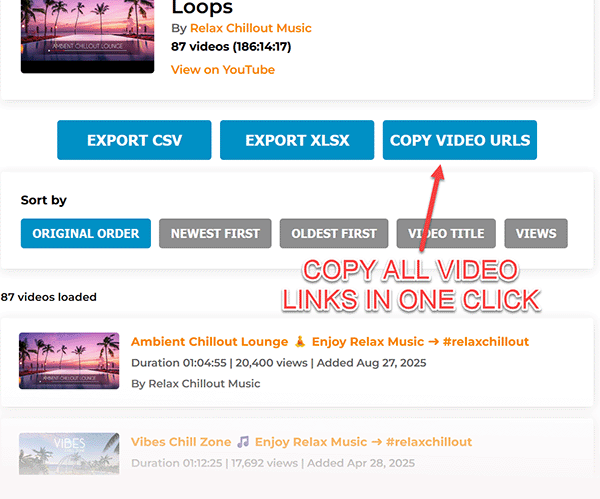
Paste the YouTube links into NotebookLM as sources, or use the copied list as a reference document for your notebook.

Best Use Cases
-
Students
Turn a course playlist into study notes or a research notebook.
-
Creators
Analyze videos from a niche playlist before planning new content.
-
Researchers
Collect interviews, explainers, lectures, and public video sources in one place.
-
Teams
Share a clean playlist reference list with clients, editors, writers, or collaborators.
FAQ
Can NotebookLM Use YouTube Videos?
Yes. NotebookLM can use public YouTube video URLs as sources, which makes it useful for summarizing, researching, and asking questions about video content.
Can I Add An Entire YouTube Playlist To NotebookLM?
You can use TunePocket’s YouTube Playlist To Text Converter / Playlist Links Extractor to extract the video links from a playlist. Then you can copy the links into NotebookLM, subject to NotebookLM’s current source limits.
Why Use A Playlist Converter Instead Of Copying Links Manually?
Playlist converter saves time. It turns the playlist into a clean list of video links, so you do not need to open each video and copy every URL one by one.
Download 14,000+ Royalty Free Music Tracks And Sound FX
Unlimited download | Lifetime license | Commercial use